Know which servers are down.
Before the phones start ringing.
ServerUpOrDown finds every Windows server in Active Directory and shows you, on one clear board, which are up and which are down. No agents to deploy. No cloud account. Nothing about your network ever leaves your network.
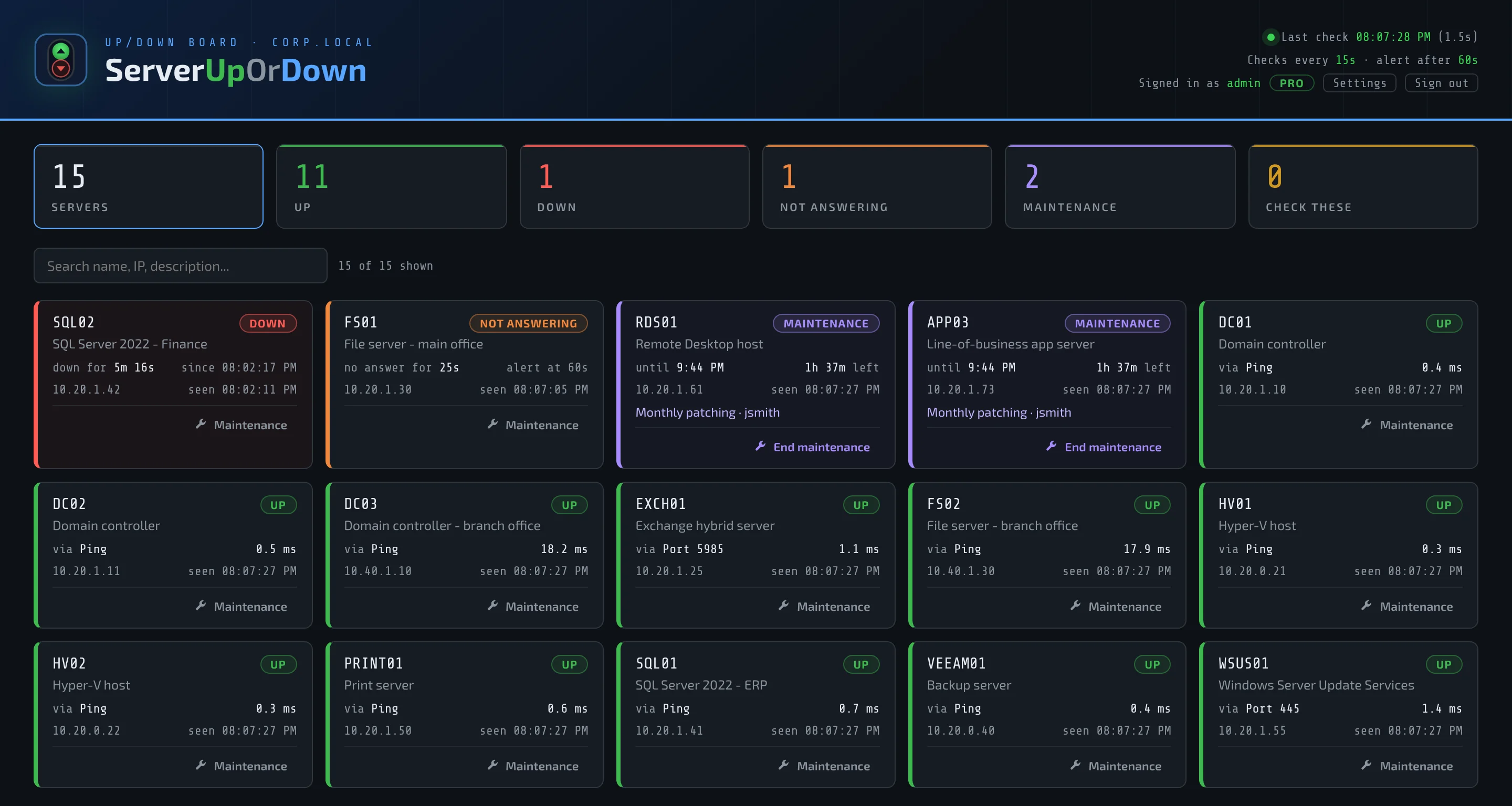
Most shops don’t need another monitoring suite. They need to know what’s down.
Big monitoring platforms take weeks to set up and bill you per sensor. Free tools want Docker, Linux and a list of every server typed in by hand. ServerUpOrDown does one job, for Windows shops, and does it well.
Not bloated
No CPU graphs, no disk sensors, no 40-tab console. One board: up, down, not answering, in maintenance. You can read it from across the room.
Knows your domain
Point it at Active Directory and every Windows server shows up on its own. New servers appear. Retired ones drop off. No spreadsheet to keep in sync.
Built for Windows
A real Windows service with a normal installer. Runs on any Windows Server you already have. No Linux box, no containers, no database server.
Ping blocked? It still knows the server is up.
Windows Firewall blocks ping on plenty of servers. Most monitors call those servers “down” and you learn to ignore the alerts. ServerUpOrDown checks the ports Windows Server already has open, so a blocked ping never becomes a false alarm.
- Ping first, then WinRM, SMB, RPC and RDP all at once. Any one answer counts as up.
- An alert delay (60 seconds by default) so a quick reboot or one lost packet never pages anyone.
- “Check these” for servers that have never answered: stale AD objects and firewalled boxes are flagged, not alarmed.
Patching night without a flood of alerts.
Two clicks put a server in maintenance for 30 minutes up to 48 hours, with a reason everyone can see. It keeps being checked, but it won’t show as down and won’t alert. When the window ends, monitoring picks up exactly where it left off.
- Visible to the whole team: who started it, why, and how long is left.
- Survives restarts. Reboot the monitor during patching and the windows are still there.
- Ends on its own. If the server is still down when time runs out, you hear about it right away.
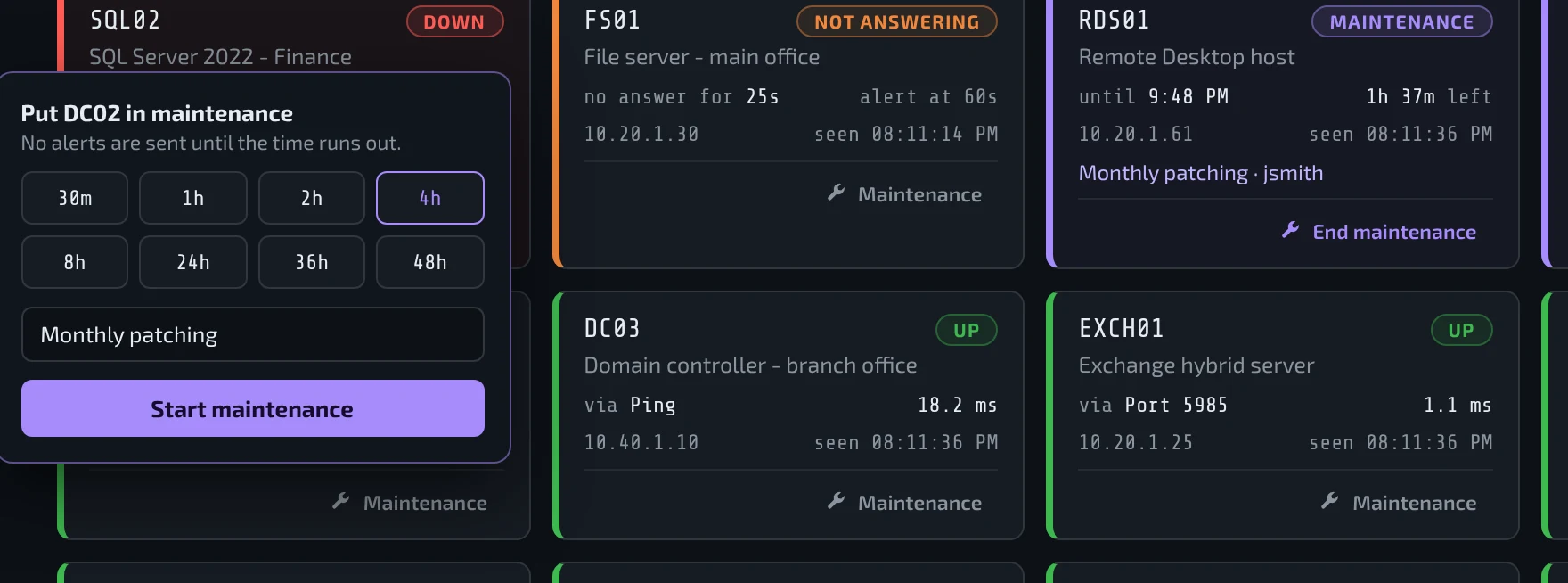
The whole feature list fits on one screen.
Active Directory discovery
Finds enabled Windows Server computer accounts, skips stale ones, and re-reads AD every 15 minutes. Limit it to one OU if you like. Add anything else by hand: NAS units, appliances, Linux.
The board
Every server as a card, color-coded and sorted with problems first. Search by name, IP or description. Filter by status with one click. Made to leave up on a wall screen.
Email alerts
A clear red email when a server goes down and a green one when it’s back, through your own SMTP server or Microsoft 365. Designed to read clearly in Outlook, Gmail and Apple Mail.
Maintenance windows
30 minutes to 48 hours, with a reason. No alerts during the window, and no forgotten windows: each one ends on its own.
Groups with their own delay
Group servers your way: by site, by role, by owner. Give slow-booting physical hosts a longer alert delay than quick VMs.
Sign in with AD groups
Let your whole team sign in with their own domain accounts, controlled by an AD group you choose. Keep the local admin as a break-glass login.
Your logo and name
Put your company name and logo on the board. The status colors stay fixed, so red always means down.
Secure by default
HTTPS from the first minute, with your own CA certificate if you have one. Salted password hashes, sign-in lockout, and it runs as a normal domain user, not a domain admin.
A real Windows service
Starts with Windows, restarts itself if it ever stops, and writes to the Windows event log. One small program, no database to look after.
From download to a full board in about five minutes.
Install it on any Windows Server
Run the installer on a domain-joined server and give it a normal domain user account to run as. No agents go on the servers you monitor.
Open the board
Browse to it from your desk and create your admin login.
https://monitor01:8443Every server is already there
Active Directory is read on the first check. Within a minute you see every server, up or down. That’s the whole setup.
Nothing about your network leaves your network.
Your server names, IP addresses and outages are your business. ServerUpOrDown has no cloud account and no telemetry. It doesn’t phone home to check your license.
One price. Every server. No subscription.
Monitor 10 servers or 1,000 for the same price. Pay once and it’s yours to keep.
Free
- Active Directory discovery
- Ping plus backup-port checks
- Unlimited servers
- The board, search and filters
- One local admin login
- No alerts or maintenance windows
Pro
- Everything in Free
- Email alerts (SMTP or Microsoft 365)
- Maintenance windows
- Groups with their own alert delay
- Sign in with Active Directory groups
- Your logo and company name
Every download starts with a free 30-day Pro trial. No credit card needed. 30-day money-back guarantee.

Made by a Windows systems administrator
ServerUpOrDown was built by a sysadmin with more than 30 years in IT, who looks after Windows servers for a living. It does what he wanted from a monitor for years and couldn’t find: find every server on its own, never cry wolf, and stay out of the way. When you email support, he’s the one who answers.
Before you ask
Do I have to install anything on the servers I monitor?
No. ServerUpOrDown only uses ping and a quick TCP connection to ports Windows Server already has open. There are no agents, and nothing changes on the monitored servers.
What does it need to run?
One domain-joined Windows Server (2016 or later) and a normal domain user account for the service. It doesn’t need domain admin rights, a SQL server, IIS or internet access. See the system requirements.
Can it monitor things that aren’t in Active Directory?
Yes. Add any device by name or IP address in Settings: NAS units, appliances, Linux servers, servers in another domain. Anything that answers ping or one of the check ports.
Is there really no limit on servers?
None. Free and Pro both monitor every server you have. Pro is priced per installation, not per server.
What happens when the trial ends?
ServerUpOrDown becomes the Free edition. The board keeps working, with every server still on it. Alerts, maintenance windows and the other Pro features switch off until you add a license key. Nothing is deleted.
What if I don’t renew updates after the first year?
Your license never stops working. You keep every version released during your update year, forever. Renew for $49 a year whenever you want the newer versions.
Does it check CPU, disk space or services?
No, on purpose. ServerUpOrDown answers one question: is the server up? If you need performance graphs, you’ll want a different kind of tool. If you need to know what’s down, this is it.
See every server you have, up or down, in five minutes.
Free for 30 days with every Pro feature. No credit card. No sales call.